Wedding invitations with digital RSVP: how they work and why they change everything
What is a digital RSVP and how does it work on a wedding invitation? We explain why it replaces phone calls, WhatsApp groups and paper lists.

Ask any couple who's already gotten married what the most stressful part of handling the invitations was, and you'll almost always hear the same answer: knowing how many guests are actually going to show up.
Calls that go straight to voicemail. WhatsApp groups where no one replies. Aunts who say "I'll let you know later" and never do. An Excel sheet you keep filling in with mental sticky notes you later can't remember.
The digital RSVP exists precisely to solve that. And even though the concept sounds technical, in practice it's the simplest thing you'll add to your wedding. Let us explain. (If you'd rather see it in action, here are Nupcii's wedding invitations with RSVP.)
🤔 What does RSVP mean?
RSVP comes from the French "Répondez s'il vous plaît" — literally, "please respond." It's an abbreviation that's been used for more than a century on formal invitations to ask guests to confirm whether they'll attend or not.
At a traditional wedding, the RSVP worked like this: the invitation arrived on paper, came with an extra stamped envelope, and the guest had to fill out a card and mail it back. The whole process could take weeks.
Today that system still works exactly the same in concept — except that instead of a paper card, the guest replies with one tap on their phone.
⚡ The digital RSVP: a quick definition
A digital RSVP is a form built into the digital invitation where guests can confirm (or decline) their attendance in a matter of seconds.
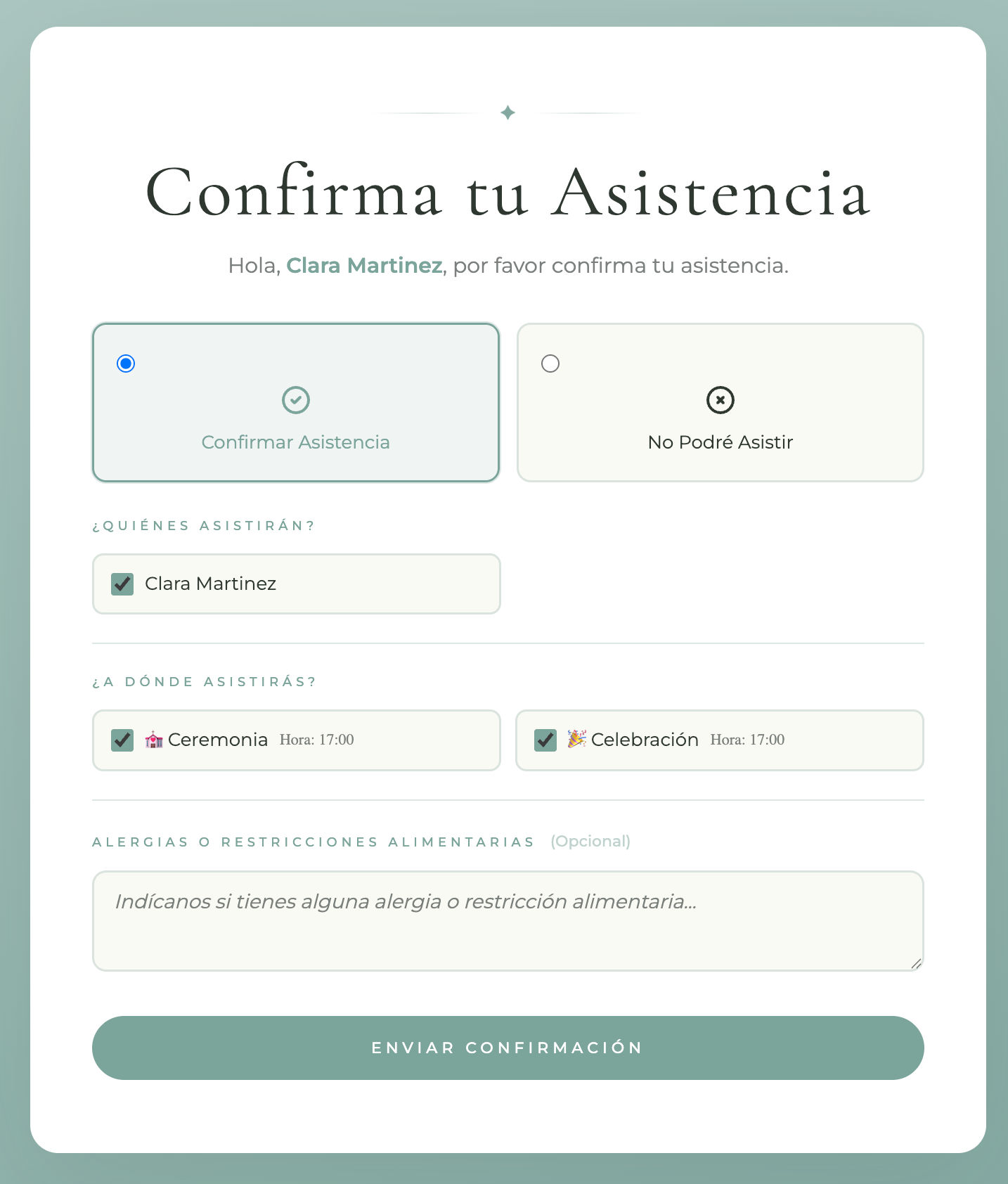
When your guest opens their invitation link, they see all the event details and, at the end, they find a clear button that says something like "Confirm attendance." With one tap, they answer a few quick questions (Are they coming? How many people? Any dietary restrictions?) and that's it.
You see it all in real time from your dashboard. No need to ask. No need to call. No need to update anything manually.
❌ Why traditional methods fail
Before we get into what the digital RSVP does well, it's worth understanding why traditional systems get so messy. These are the most common causes:
Calls pile up
If you have 150 guests, that's potentially 150 calls — multiplied by the times they didn't pick up the first time. That emotional load, on top of organizing the rest of the wedding, is exhausting.
WhatsApp groups turn into chaos
The intention is good: a group where everyone confirms. The reality: 50 messages mixing confirmations, dress code questions, cat photos and off-topic comments. Whoever confirmed gets lost in the noise.
Excel sheets live with one person
If you're the one keeping track in Excel, your partner can't check it in real time. If they confirm someone on their end, you end up with two different versions of reality.
People forget to confirm
Not out of bad intentions — life just distracts them. Without a system to remind them and without a clear button to tap in the moment, many guests end up confirming the day before over WhatsApp (or the same day, in person).
🔄 How a digital RSVP works, step by step
The process is the same on any modern digital invitation platform. Let's walk through it using Nupcii as an example:
Step 1 — The guest receives their unique link
You send each guest's personalized link over WhatsApp, email or any channel. Each person gets their own link with their name — it's not a generic message for everyone.
Step 2 — The guest opens the invitation
With one tap, the full invitation opens in their browser. They don't need to install anything or sign up anywhere. They see the couple's names, the countdown, the event details, the background music, everything.
Step 3 — The guest confirms or declines
At the end of the invitation they find the confirmation button. In a few seconds they answer:
- Whether they will attend and how many people (if they have spots)
- Whether they can't make it
- Any dietary restrictions (if you enabled that question)
That's all. They don't have to text you, call you, or remember to let you know later.
Step 4 — You see the confirmation instantly
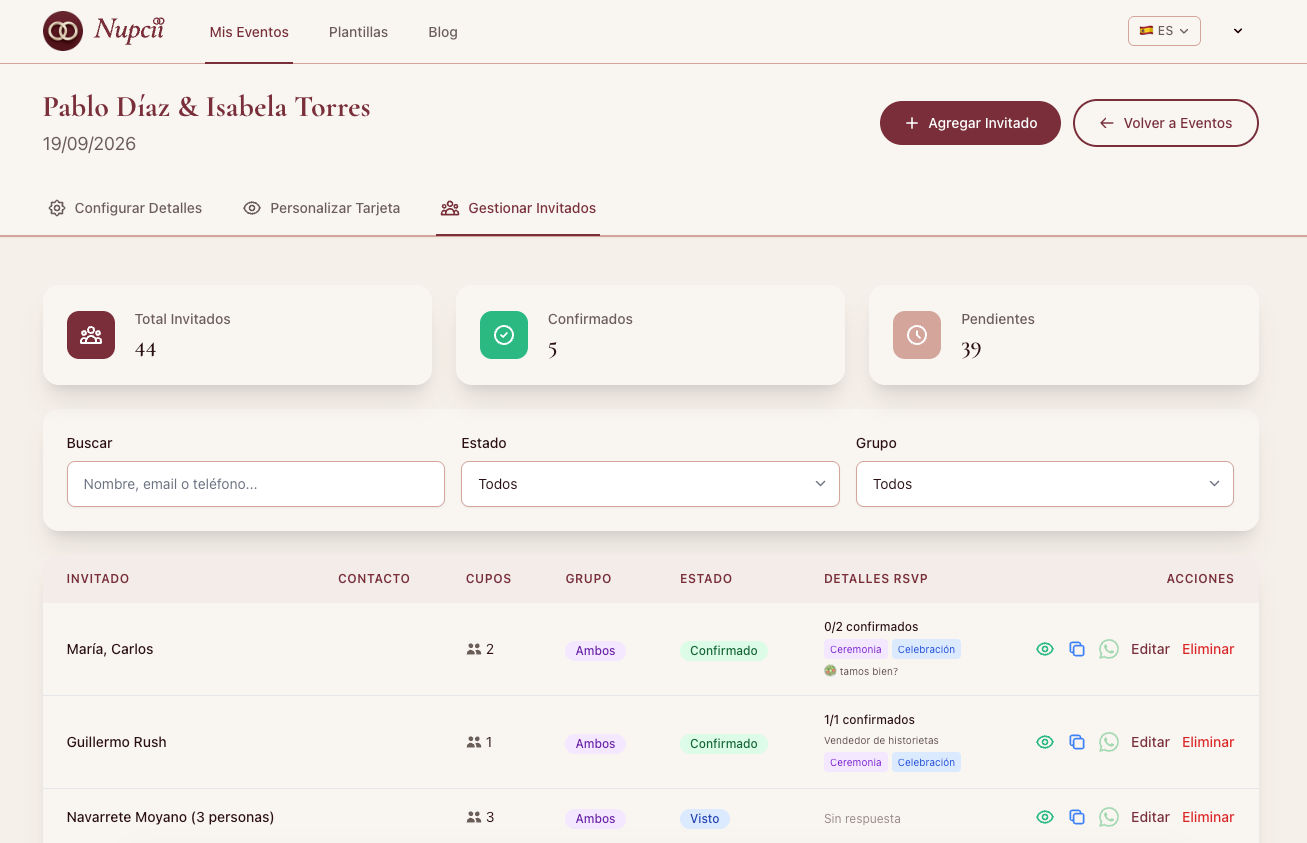
Your dashboard updates in real time. You'll see:
- Who opened their invitation
- Who confirmed attendance
- Who declined
- Who is still pending
- How many people are coming in total
Without having to update anything. Without keeping a manual tally.
✨ What changes with a digital RSVP
It's not just a time saver — it's a shift in how you manage the entire final stage of your wedding. These are the most important practical differences:
1. You see the real numbers at any moment
When the caterer asks how many people are coming, you open your dashboard and give them the exact number for that day. No reconciling lists.
2. Your partner sees the same thing you do
You can both open the dashboard from your phones whenever you want. There's no "one person who owns the list" — it's shared information.
3. Guests confirm whenever it suits them
Traditionally, guests confirm when you chase them down. With a digital RSVP, they do it the moment they receive the invitation — because it's one tap away.
4. You can follow up without pushing
If two weeks out you notice some confirmations are missing, you can resend the link to the pending guests with a friendly message. The guest replies right from there.
5. You drastically reduce last-minute cancellations
Someone who confirms by tapping a button commits differently than someone who just said "I'll see if I can make it" over WhatsApp. The act of formally confirming makes attendance more solid.
💡 Nupcii Tip: Turn on email notifications in your dashboard. Every time someone confirms or declines, you get an instant alert. It's the easiest way to watch your list progress without having to log in and check.
💬 The most common questions about digital RSVP
"Is it complicated for my older guests?"
It's a common worry, but in practice the digital RSVP is simpler than anything else. If your grandmother knows how to open WhatsApp and tap a link, she knows how to use a digital RSVP. The button is clear, the form is 3 questions at most, and there's no account to create anywhere.
"Can I customize the RSVP questions?"
Yes. In Nupcii you can choose whether to ask about dietary restrictions or just about attendance. If you don't want that question to appear, you simply turn it off in the dashboard.
"What if a guest doesn't have a phone?"
It's very rare these days, but if it happens, you can always confirm manually from your dashboard on their behalf. It's an editable field.
"Can the guest change their answer?"
Yes. If they confirmed but something comes up later, they can open the same link and update their response. You'll see it reflected instantly.
"Can I disable the RSVP entirely?"
In Nupcii you can't disable the RSVP completely — it's a core part of the digital invitation. However, you can turn off specific questions (like the one about dietary restrictions).
🛠️ How to look after your digital RSVP so it works well
Having the tool is half the job. The other half is knowing how to use it. Three practices that multiply the results:
-
Set a visible RSVP deadline. Something like "Please confirm before September 15" inside the invitation. Without a deadline, people don't feel any urgency. If you're not sure about when to set that deadline, we explain it in another article.
-
Send a reminder two weeks out. Resend the link to those who haven't confirmed yet with a friendly message. It's not pushing — it's helping them not forget.
-
Check your dashboard every 3 or 4 days. You don't need to do it every day, but do stay on top of it. That way you catch trends early (if two weeks in only 30% have confirmed, something needs adjusting).
💡 Nupcii Tip: If you haven't built your invitation yet, first take a look at the step-by-step guide to creating your digital wedding invitation — the RSVP is already included and sets itself up.
📋 In short
A digital RSVP is:
- Faster — you confirm with one tap
- More reliable — the data is in real time, not on a sheet
- More convenient for the guest — no calls, no groups
- More useful for the couple — all the information on a shared dashboard
- Kinder to your planning — zero stress over "how many are we in the end?"
It's not just a technological advance — it's how today's weddings solve one of their oldest problems.
✨ Conclusion
On Nupcii, every wedding invitation with digital RSVP comes ready from the very first moment. You don't have to configure it, you don't have to install anything — it's simply there, ready for your guests to use and for you to see the responses in real time.
With the Celebración plan ($19 USD, one-time payment) you get unlimited guests with real-time RSVP, email notifications every time someone confirms, direct sending over WhatsApp and human support. You pay once and your event is yours — no subscription, no surprises.
If you want to see how it looks before deciding, you can start completely free with the Free plan and create your invitation with up to 40 guests. The RSVP works the same on both plans.
✨ Because knowing how many people are coming to your wedding shouldn't be the hardest part of planning it.
Ready to create your invitation?
Start free today. No credit card required.
Create my invitation for free