How to send all your wedding invitations on WhatsApp in minutes (with your own message)
Step-by-step tutorial to send your wedding invitations on WhatsApp to every guest: your message, your voice, and a sending queue that does the rest.

Let's do some quick math. Your wedding has 120 guests. For each one: find the contact, paste the link, delete the message that doesn't sound like you, write your own, hit send, and try to remember where you left off. One minute per guest, being optimistic? That's two hours of your life, probably on a Sunday night.
At Nupcii we decided that made no sense. That's why sending on WhatsApp now works differently: you write your message once, and a sending queue walks you through your guests one after another, everything ready so all you do is tap send. That same 120-guest wedding: about 15 minutes, from your phone.
In this tutorial we'll show you exactly how, step by step. If you're still deciding whether your invitation will be digital, take a look at Nupcii's WhatsApp wedding invitations first, then come back, this will still be useful.
😮💨 Why sending invitations one by one wears anyone out
We covered it in our complete guide to inviting guests on WhatsApp: the mass group chat, the heavy PDF and the generic image are the classic mistakes. The right way has always been a personalized link per guest, so each person receives their invitation with their name and their seats.
But let's be honest: until now, sending 120 personalized links was still manual work. And there was a second problem almost nobody talks about: the message. When a platform writes the text for you, every guest gets the same template words. Your aunt Mary deserves something that sounds like you, not like software.
Those two problems are exactly what the new sending flow solves.
✍️ Step 1: write your message (once)
Open your event in Nupcii, go to Manage Guests and tap the green Send invitations button. The first time you're in, tap Edit message at the top right.
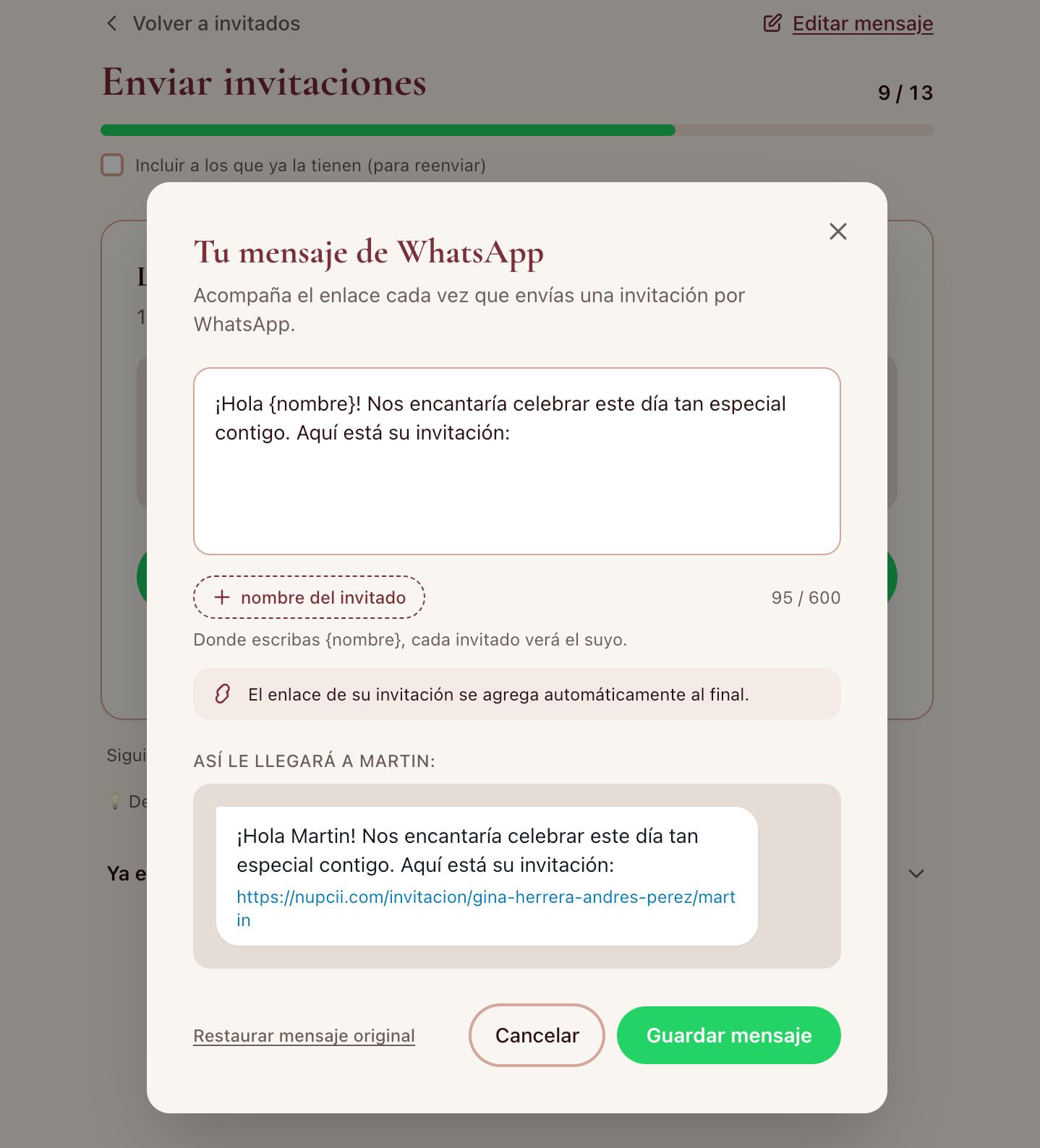
This is where you write the message that will go with every invitation, in your own words. Two details make it special:
- The name placeholder. Wherever you insert {nombre} (there's a button that does it for you), each guest sees their own: "Hello Mary!", "Hello Rodriguez Family!". One message, hundreds of personal greetings.
- The link adds itself. Each guest's invitation link is automatically attached at the end of the message. You can't delete it by accident, and you never have to copy it from anywhere.
As you type, a live preview shows the message exactly as a real guest from your list will receive it, in a WhatsApp bubble. What you see is what they get.
💡 Nupcii Tip: write the message as if you were sending it to your best friend, then reread it thinking of your mother-in-law. If it works for both, it's the right message.
📲 Step 2: open the sending queue
Save your message and look at the screen: the queue is ready. Nupcii automatically lines up every guest pending to be sent who has a phone number, and shows you the first one.
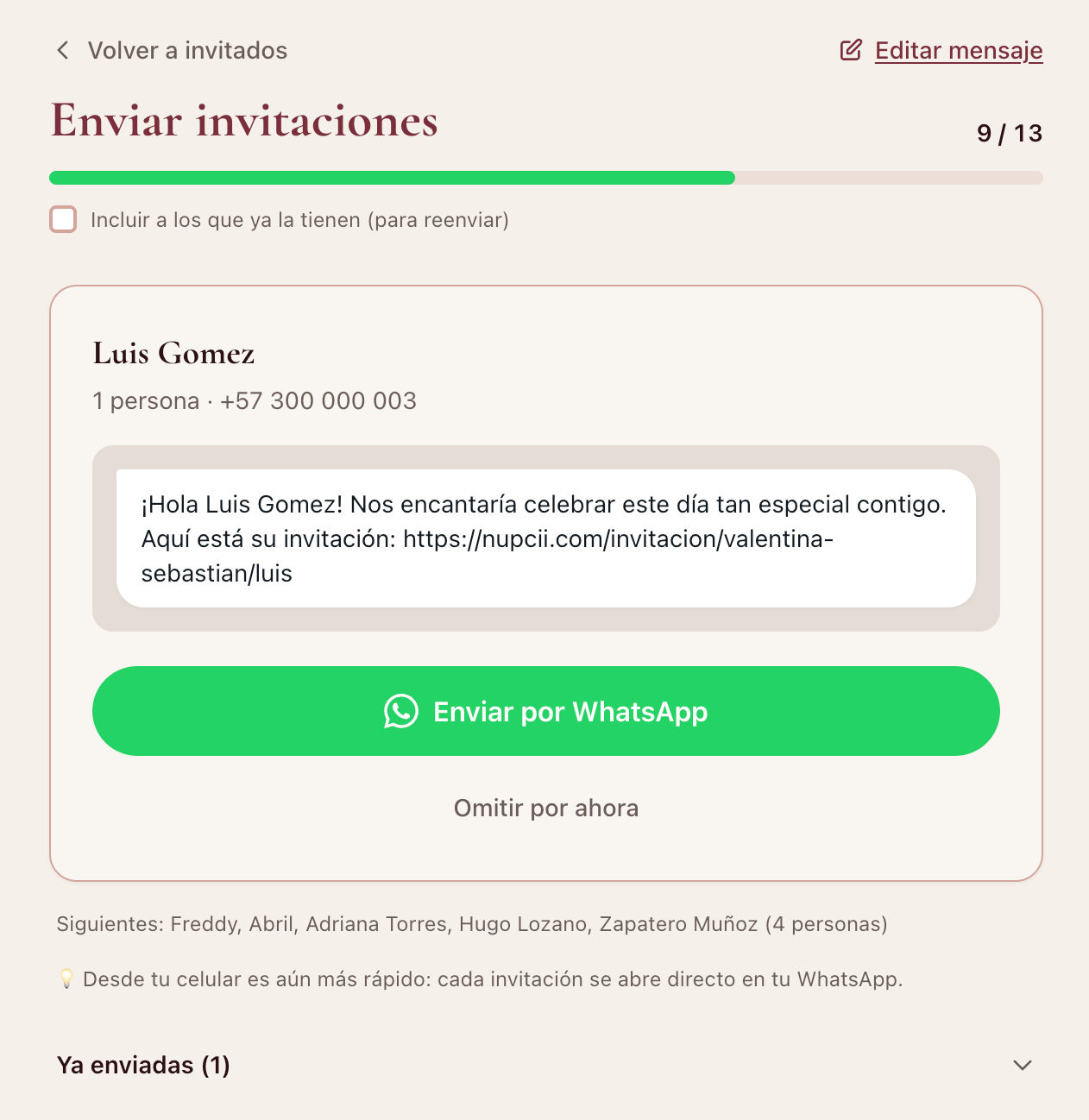
Each card shows who you're about to send to, how many seats they have, and the exact message they'll receive. At the top, a progress bar tells you how many are done and how many are left. No more "where was I?".
⚡ Step 3: send, come back, repeat
Here's the magic of the rhythm:
- Tap Send on WhatsApp: that guest's chat opens with the message and their link already written.
- Tap send in WhatsApp (one tap).
- Come back to Nupcii: the next guest is already waiting on screen.
Tap, send, back. Tap, send, back. That's the whole process, and with your phone in hand it becomes almost hypnotic. Every sent invitation is marked automatically, and if you tapped someone by mistake, the Undo button fixes it instantly.
Edge cases are covered too:
- "Skip for now" moves a guest to the end of the queue without marking them (for that cousin who deserves a more personal note).
- Guests without a phone number are grouped at the end: you can add their number right there and they join the queue, or copy their link to send it through another channel.
💡 Nupcii Tip: do it from your phone. It works on desktop too (WhatsApp Web opens), but on your phone the tap-send-back cycle is so fluid that 100 invitations are done in a quarter of an hour.
✅ Step 4: always know who's missing
Back on your guest list, every sent invitation carries its "Sent" badge, and the "Not sent" filter shows you in one click exactly who's left. From there, each guest's full journey reads at a glance: Sent → Viewed → Confirmed.
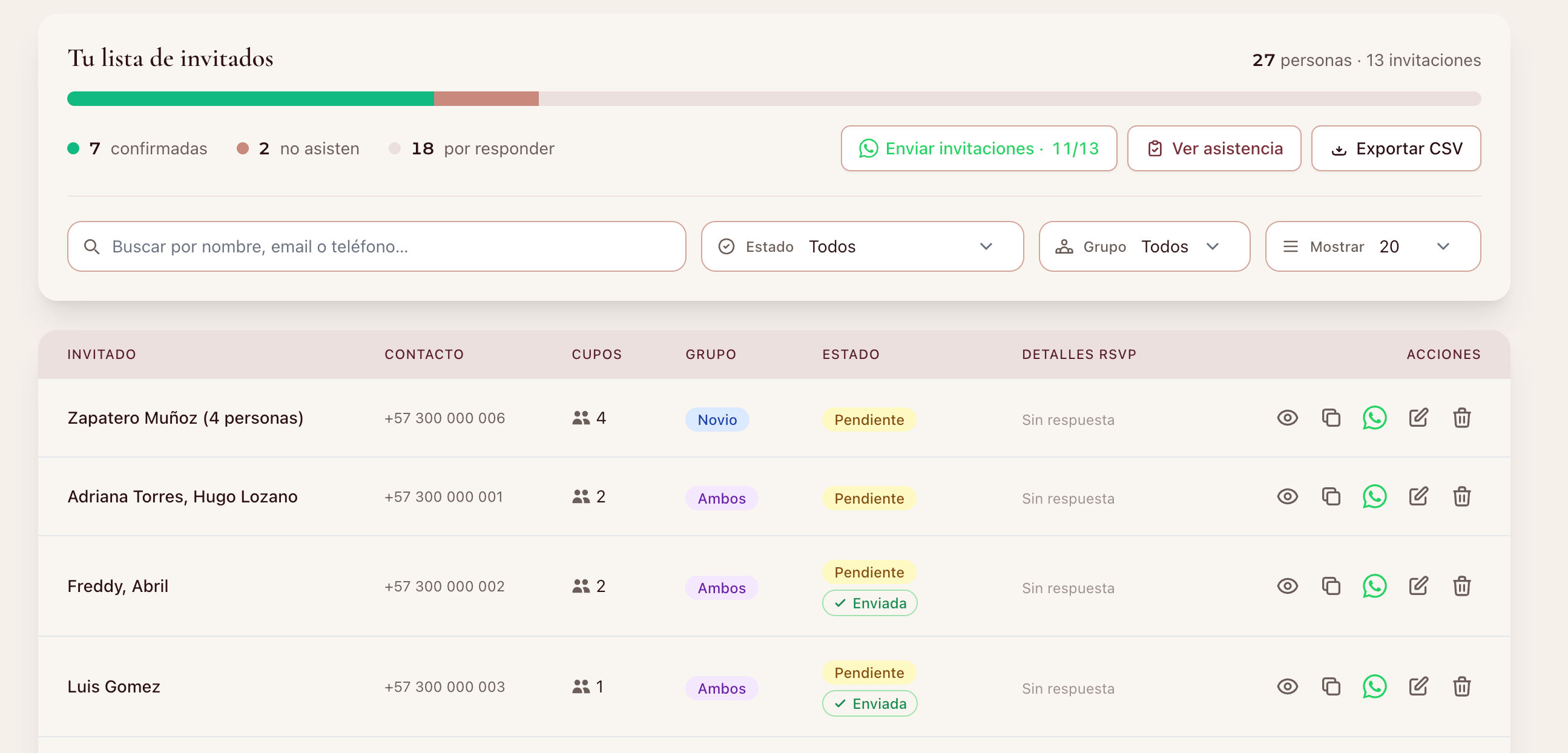
And since every invitation includes a digital RSVP, confirmations arrive in your dashboard on their own. No chasing anyone through chats.
Did the time or venue change after sending? The queue has a resend mode: turn on "Include guests who already have it" and go through everyone again with the updated information, at the same one-tap-per-person pace.
💬 Three message ideas to get you started
Writer's block in front of the textarea? These three styles work (remember {nombre} is replaced automatically):
The warm classic:
Hello {nombre}! 💕 We're getting married and we can't imagine that day without you. Here's your invitation with all the details:
The short and elegant:
{nombre}, it would be an honor to have you with us on the most important day of our lives. Your invitation:
The fun couple's one:
{nombre}! It's official: there's a date, there's a party, and there's a seat with your name on it 🎉 Confirm here:
💡 Nupcii Tip: end your message asking for the confirmation ("confirm here", "let us know if you're coming"). Invitations whose message explicitly asks for the RSVP get confirmed faster.
📋 In short
| Before | Now with Nupcii |
|---|---|
| Finding each contact and pasting the link by hand | The queue brings you the next guest, everything ready |
| The same template message for everyone | Your message, with each guest's name |
| "Who's missing?" in a notebook | "Sent" badge, "Not sent" filter and live progress |
| Two hours on a Sunday | About 15 minutes for 100 guests |
✨ Conclusion
Sending your invitations should feel like the exciting moment it is, the "it's really happening!", not like office work. With your message written once and the sending queue doing the repetitive part, that moment is yours again.
WhatsApp sending is included in the Celebración plan ($19 USD, one-time payment, no subscription), along with unlimited guests and every premium template. If you don't have your invitation yet, create your free account, design yours with Nupcii's digital wedding invitations and join the 600+ couples who already sent theirs without losing a Sunday.
✨ May the only thing repeated 120 times be your guests' excitement when they open it.
Ready to create your invitation?
Start free today. No credit card required.
Create my invitation for free